Maintenance & Updates
Permission Levels
Access to wiki content is gated by roles. Everyone is assigned the “Player” role upon account creation; additional roles are assigned by authorized users. A user can be assigned more than one role. They will inherit the permissions from the highest role they possess.
The roles, from most to least restrictive:
Traveler: A public visitor. Can read public-facing pages but cannot access scarce sections or create any content.
Player: The standard logged-in user. Can read all public rules and lore. Can also create and edit their own personal blog in the 'Character Journals' section.
Plot: A keeper of secrets. Can access the hidden Plot Secrets & GM Codex, player backstories, and scarce item lists.
Editor: An architect of the public world. Can create and edit rulebooks, chapters, and pages. A higher level or selective access is needed to have delete permissions. I might change this idk I just don’t want people deleting things willy-nilly
Staff: Marshals. Can edit all standard and scarce rulebooks and chapters, moderate community content, and manage user roles and permissions.
Rules: The highest content role. Has access to all pages and can edit all rulebooks, chapters, and pages. Has access to the Dev Wiki during the Feb Feast Lockdown period.
Admin: Can create, destroy, and alter the very fabric of the wiki. Manages site settings, user roles, and all permissions.
The Development Wiki Process
To maintain consistency and prevent errors on the live site, all edits are made on a separate "Dev Wiki", which is where all editors will do their work. Your changes will not go public immediately. Once your work is finished and reviewed it will be pushed to the live Wiki as part of a scheduled update, typically done once a month.
The Dev Wiki can be found at this link: https://devwiki.kingdomsofnovitas.org/
Live Wiki Fixes: Urgent changes, like fixing a major typochange or clarifyingto a rule page mid-season, are affectionately called "hotfixes." These are an exception and are handled by the Lead Editor to ensure the live site remains stable.
Version Control
Documenting Changes
Whenever you make edits outside of the scope of “fixing a typo”, click “Set Changelog” in the upper right of the editing window and document:
A quick summary of what you changed.
Why you changed it (rules update, fixing an error, etc.)
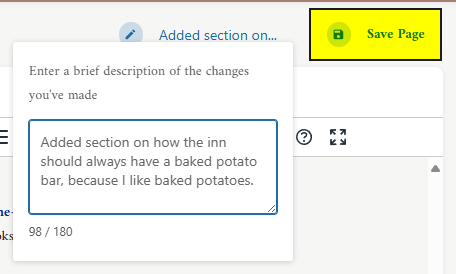
When you click “Save Page”, the “Revisions” link will automatically record the date/ time and your name, as well as notating which version of the page is currently showing:
Review Schedule
Need to actually look at this
Rules Pages: Divide into sections, check throughout the year
Lore Pages: Check once a year for consistency
Safety Pages: Check after any incidents and at FF
Annual Feb Feast Update Procedure
To ensure consistency during the major yearly rules update, the Wiki Admin will be responsible for making all changes related to Feb Feast announcements. During this period, access to the Dev Wiki will be locked for all non-Admin or Rules users and scheduled updates will be put on hold. Standard editing permissions will be restored once Feb Feast has concluded.